


Avast Cleanup – Phone Cleaner
4.636.42K Reviews
App Specs
- Version
- 26.12.2
- Updated On
- License
- Free
- Downloads
- 50,000,000+
- Developer
- Avast Software
- Categories
- Tools
- Platform
- Android, iOS
Screenshots
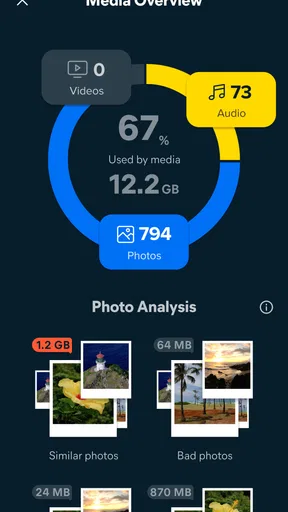
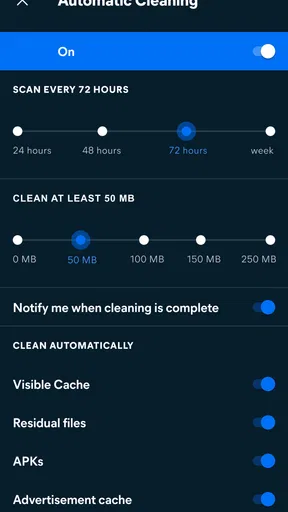
 Analysis by AppCompare
The most useful way to think about Avast Cleanup – Phone Cleaner is as a storage helper, not a magic switch that can make every phone feel new. When space is tight, temporary files and forgotten downloads can get in the way of installing an update, saving a video, or taking more photos. I find the app’s central promise most relevant in that moment: it helps identify clutter so I can decide what is worth removing. The benefit is practical and immediate when storage is the problem; it is much less convincing if I expect a cleaner to fix every cause of a slow phone.
Space is the main reason to open it
Avast Cleanup is a free tools app from Avast Software, and its storage-cleaning focus gives it a straightforward job. It has a 4.6 average from around 1.5 million ratings, with over 50 million installs, so it is a familiar option for people looking for a guided way to manage clutter. The app is rated for Everyone, and its current version is 26.03.0. I would approach it as a convenient second opinion on what might be removable rather than handing over every deletion decision automatically.
That distinction matters because “junk” is not always obvious to the person using a phone. A cached file may be replaceable, while an offline map, downloaded episode, or document may be something I deliberately keep. My best habit with any cleaner is to review the items it presents before confirming a cleanup, especially when I am trying to recover space in a hurry. A few seconds of checking can prevent the annoying experience of deleting something useful and then needing to download it again.
How I would use a cleanup scan
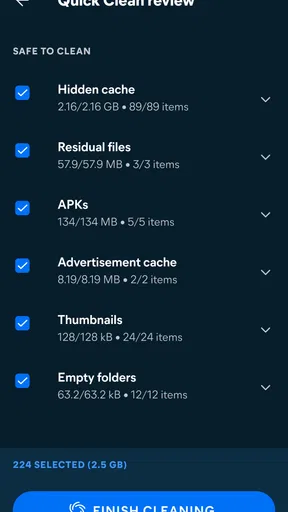
I would start with a clear goal: make room for a specific download, capture more photos, or stop a low-storage warning from interrupting normal use. Then I would run a scan and look at the categories it identifies instead of treating the largest suggested cleanup as automatically the best one. If I recognize a category as temporary clutter, removing it can be an easy win. If the space is occupied by files I chose to keep, a cleaner cannot make that trade-off disappear; I need to move, delete, or manage those files myself.
A helpful routine is to use the app when storage pressure appears, not to clean repeatedly just because a button is available. Temporary data may be recreated as I use apps, so clearing it over and over can mean extra work without a lasting improvement. I would also check whether a frequently used app needs its cached content for a smoother next session. This makes cleanup a deliberate maintenance step rather than a daily ritual.
A realistic low-storage moment
Imagine I am about to record a family event and the phone warns that space is running low. I would open the cleaner, review the scan, and remove only the items I can identify as disposable. If that is not enough, I would look at large videos, old downloads, or apps I no longer use, because those are choices about my own content rather than hidden clutter. This workflow is more useful than tapping a broad “clean everything” control and hoping the phone keeps everything I care about.
The same approach helps before a trip or a long commute. I might want room for new photos while keeping maps or media available offline. In that case, I would check those saved items myself before cleaning, since an app’s idea of recoverable space may not match my plans. The practical gain is not just extra storage; it is knowing what I removed and avoiding a cleanup that creates a new problem later.
Worth Reading Before You Choose

Flipboard Shows What News Apps Must Do Beyond the Feed

Switching to Android Auto Means Rethinking Your Driving Routine

Google Calendar Makes a Crowded Week Easier to Manage

Ludo King Makes the Most of the Minutes Between Plans

Baby Panda World Brings Quick Play to Modern Phones, but Its Game Library Feels Busy

ESPN’s Live Game View Makes Following Close Games Easier
The Magic of Avast Cleanup
First things first, let’s talk about what this app does. The Avast Cleanup – Phone Cleaner is designed to boost your phone’s performance by clearing out all the digital clutter. You know, those unnecessary files and apps that just sit there, taking up space and slowing everything down.
User-Friendly Interface
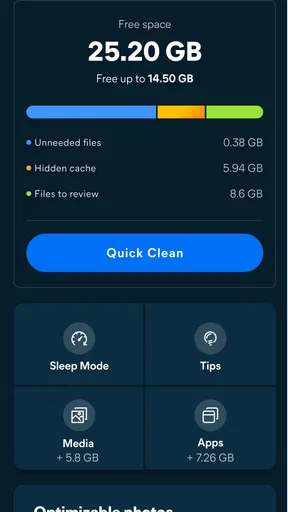
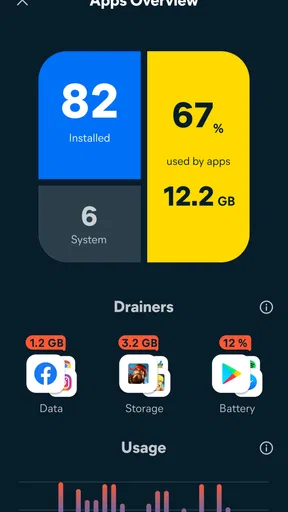
When I first opened the app, I was greeted by a clean and intuitive interface. It’s incredibly user-friendly, which is a huge plus for someone like me who doesn’t want to spend ages figuring out how to use it. The dashboard gives you a quick overview of your phone’s current state, including storage and RAM usage. It’s like having your personal tech assistant right there in your pocket.
"It’s like having your personal tech assistant right there in your pocket."
Clearing the Clutter
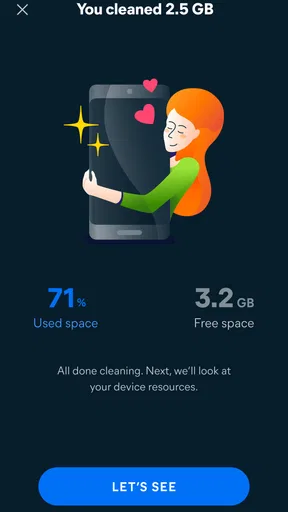
The app's primary function is to clean up junk files. With just a couple of taps, it scans your entire phone and identifies files that can be safely deleted. This includes cache files, temporary data, and other digital debris that can accumulate over time. I was amazed at how much space I freed up on my phone — it was like a breath of fresh air.
Battery Life Saver
Another feature that caught my attention was the battery saver. This nifty tool helps you get the most out of your battery by identifying apps that drain power and offering solutions. You can either put these apps to sleep or adjust their settings to be less power-hungry. I noticed a significant improvement in my phone's battery life after using this feature.
Boost Your Phone’s Speed
We all want our phones to run faster, right? The app’s speed booster feature is designed to help with that. By freeing up RAM, it ensures your phone runs more smoothly. I tried this out while playing some heavy-duty games, and the difference was noticeable. My phone didn’t lag as much, and the overall gaming experience was much more enjoyable.
Photo Manager
One of the coolest features I found was the photo manager. It helps me organize my ever-growing collection of photos by identifying similar images and suggesting which ones to delete. It’s like having my own personal photo curator. Plus, it offers the option to compress photos, saving even more space without compromising on quality.
Ad-Free Experience
If there’s one thing I can’t stand, it’s intrusive ads. Thankfully, Avast Cleanup – Phone Cleaner offers an ad-free experience with its premium version. This means you can clean and optimize your phone without any interruptions. Trust me, it’s worth every penny.
Final Thoughts
So, is Avast Cleanup – Phone Cleaner worth it? In my opinion, absolutely. It’s a comprehensive tool that does exactly what it promises. From cleaning junk files to optimizing battery life and boosting performance, it covers all bases. If your phone has been feeling sluggish lately, I highly recommend giving this app a try. Your phone will thank you, and so will you!
Where it fits beside built-in tools
On Android, the first alternative I would consider is the phone’s own storage screen and file manager. Those tools can be enough if I already know what is taking up space and am comfortable reviewing downloads, large media, and unused apps myself. The advantage of a dedicated cleaner is the more guided overview: it can make potential clutter easier to spot without requiring me to inspect every folder. The trade-off is that I still need to judge suggestions, because only I know whether a file is disposable.
I would not expect a cleaner to outperform a careful manual review in every situation. If a phone is nearly full because it holds years of videos, deleting temporary files may barely change the picture. If the issue is an aging battery, a weak network connection, or a demanding app, storage cleanup may not solve it either. The tool is most worthwhile when the problem is specifically clutter and I want help finding it, not when I am looking for a universal repair service.
Useful habits before confirming a cleanup
For a safer workflow, I would scan when I have a moment to review the results, rather than while rushing to free space for an urgent download. I would pay particular attention to anything connected with offline use, such as content saved for a journey, and avoid assuming that every large item is expendable. If I am unsure what a category contains, leaving it alone is a sensible choice; freeing a little less space is better than disrupting something I rely on.
I would also treat photo suggestions as prompts, not instructions. Similar pictures may include a sharp original and a slightly different moment that matters to me, so I would inspect candidates before deleting them. Compression can be useful when I want to retain a large collection, but I would compare the result with my needs before applying it broadly. Keeping a copy of important images elsewhere before a major cleanup is a sensible precaution, particularly if those photos are irreplaceable.
What the free option means in practice
The app is free to install, while optional in-app purchases range from $0.99 to $59.99 per item. I would begin with the no-cost use and decide whether the available cleaning workflow is enough before considering a purchase. A paid option only makes sense to me if its specific benefit addresses a recurring annoyance; I would not pay simply because a phone once ran low on space. The app’s minimum operating system is 10, so compatibility is worth checking before making it part of a regular routine.
One question people often have is whether a cleaner can keep storage permanently clear. I would not count on that: apps and everyday use can create or download more data after a cleanup. Another is whether it can make an older phone fast again. It may help when clutter is contributing to the problem, but it cannot change the phone’s hardware or guarantee smoother performance in every app. Thinking of it as maintenance rather than a permanent fix keeps expectations grounded.
Who should choose it, and who can skip it
I see the strongest fit for someone who wants a guided way to inspect storage, does not enjoy sorting through folders, and regularly runs into space warnings. It can also suit a family member who prefers a clear dashboard and a few decisions over learning where every file lives. For a photo-heavy user, the image suggestions may be useful, provided they are willing to review them carefully rather than bulk-delete without looking.
On the other hand, I would skip it if I already manage storage comfortably with built-in tools, rarely run short of room, or expect one tap to fix battery wear and every performance issue. People who keep lots of offline content should be especially selective: convenience is not a substitute for checking what they have saved. For those users, manual file management may feel more transparent and give better control.
A measured recommendation
My overall view is that Avast Cleanup is best used as a practical guide to reclaiming space, with the user making the final call. Its broad popularity and strong average rating suggest that many people find the approach useful, but neither popularity nor a clean dashboard removes the need to review deletion suggestions. I would open it when storage pressure has a real consequence, check what it flags, and stop once I have made enough room for my actual need.
That makes it a reasonable tool for people who want help finding clutter without turning phone maintenance into a project. It is less compelling for anyone expecting a guaranteed speed boost or a permanent cure for low storage. Used thoughtfully, its value is simple: it can make the cleanup process easier to navigate, while the safest results still come from knowing what I want to keep.
Pros
- Improves device performance noticeably.
- User-friendly interface and navigation.
- Effective junk file removal.
- Customizable cleaning options.
- Boosts battery life efficiently.
Cons
- Contains ads in the free version.
- Some features require premium upgrade.
- Occasional false positives in scans.
- May slow down older devices slightly.
- Limited functionality without internet.
FAQs for Avast Cleanup – Phone Cleaner
What features does Avast Cleanup offer for enhancing phone performance?
Avast Cleanup provides a comprehensive suite of tools designed to boost your phone’s performance. It includes junk file removal, cache clearing, and optimization of photo libraries by reducing photo size without losing quality. Additionally, it offers app hibernation to free up memory and improve battery life, ensuring your device runs smoothly.
Is Avast Cleanup safe to use on my Android or iOS device?
Yes, Avast Cleanup is designed with user safety in mind. It is developed by Avast, a reputable company known for its security software. The app prioritizes user privacy and ensures that no personal data is accessed or shared without consent. It performs cleaning tasks efficiently without risking your device’s functionality.
How does Avast Cleanup manage storage space on my device?
Avast Cleanup efficiently manages your device’s storage by identifying and removing unnecessary files such as cache, leftover data, and duplicate photos. It provides detailed insights into your storage usage and suggests files that can be safely deleted. This proactive approach helps in freeing up significant space, enhancing device performance.
Does Avast Cleanup affect the performance of other apps on my phone?
Avast Cleanup is designed to enhance, not hinder, the performance of other apps on your device. By freeing up RAM and hibernating background apps, it actually speeds up your device. The app carefully manages resources without interfering with the functionality of your installed applications, ensuring an optimized user experience.
Are there any subscription costs associated with Avast Cleanup?
Avast Cleanup is available as a free download with basic features. However, for full access to advanced features like automatic cleaning, photo optimization, and expert tips, a premium subscription is available. Users can choose from various subscription plans that cater to different needs and budgets, ensuring flexibility and value for money.


